API Key Rotation for Developers and DevOps: Zero-Downtime Guide
API Key Rotation for Developers and DevOps: Zero-Downtime Guide

The safest, production-ready approach to API key rotation combines a dual-key overlap pattern with dynamic secret retrieval and automated orchestration. That combination keeps services live during the swap, limits the blast radius of any compromise, and gives you a clean audit trail for SOC 2 or PCI-DSS reviews.
Three things to do right now:
- Verify dynamic secret retrieval. Confirm every consumer fetches credentials from a secrets manager at startup rather than reading a hardcoded value.
- Implement dual-key rotation. Create the new key, let both run in parallel during a defined grace period, then revoke the old one only after validation passes.
- Automate and monitor. Wire a rotation orchestrator to your secrets manager and set alerts on rotation_failure_total and api_key_age_days before you touch production.
Pro Tip: Run a smoke test against your staging environment using the new key before you schedule any production rotation. A five-minute preflight catches 90% of consumer misconfiguration issues before they become incidents.
Key Takeaways
Zero-downtime API key rotation requires dual-key overlap, dynamic secret retrieval, and automated orchestration working together — no single piece is sufficient on its own.
| Point | Details |
|---|---|
| Use dual-key overlap | Generate the new key, run both in parallel during a grace period, revoke the old key only after validation. |
| Automate with a secrets manager | AWS Secrets Manager, HashiCorp Vault, or GCP Secret Manager handles scheduling, versioning, and rollback automatically. |
| Rotate on a policy schedule | Production keys should rotate every 90 days, with service-to-service and admin keys rotated every 30 days. |
| Monitor and alert | Track rotation_success_total, rotation_failure_total, and api_key_age_days; page on any failure immediately. |
| Jundago for enterprise governance | Jundago’s Command Center automates rotation pipelines across AWS, Azure, GCP, and Oracle Cloud with built-in SOC 2 and PCI-DSS audit trails. |
Table of Contents
- What does rotating an API key actually mean?
- Which rotation strategy fits your situation?
- Zero-downtime rotation: a step-by-step checklist
- Automating rotation with Vault, AWS, GCP, and Kubernetes
- Reusable code snippets for common rotation flows
- How do you test and monitor rotation jobs?
- Common pitfalls and practical best practices
- How does Jundago support rotation, governance, and compliance?
- The part most rotation guides skip
- Jundago handles rotation and governance for regulated teams
- Further reading and authoritative sources
What does rotating an API key actually mean?
Credential rotation means replacing an existing credential with a new one while keeping service disruption at zero. The term covers several distinct credential types, and the rotation mechanics differ for each.
- Service-to-service keys. Machine identity credentials used between internal microservices or between your platform and a cloud provider’s API. APIScout recommends rotating these periodically to limit exposure.
A CI/CD pipeline might hold a static GitHub Actions secret for a third-party deployment API. An internal payment service might use an OAuth client credential to call a billing provider. A Kubernetes pod might pull a short-lived Vault token at startup. Each of these needs a different rotation cadence and a different toolchain.
Which rotation strategy fits your situation?
The right strategy depends on three variables: whether your provider supports two simultaneous valid keys, how much automation your team can build, and how much downtime risk you can tolerate.
| Strategy | Automation effort | Downtime risk | Security level | Operational complexity |
|---|---|---|---|---|
| Dual-key rolling swap | Medium (orchestrator + secrets manager) | Near zero | Good (short overlap window) | Moderate (provider must support two keys) |
| Ephemeral / short-lived tokens | High (Vault or cloud IAM setup) | Zero | Excellent (TTL-bound, auto-expire) | High (requires dynamic secret backend) |
| Dynamic secrets (Vault, cloud IAM) | High | Zero | Excellent | High (per-service lease management) |
| Manual UI rotation | None | Low to medium | Acceptable for low-frequency keys | Low (human-driven, ticket-based) |
Dual-key overlap is the workhorse pattern for most teams. You generate a new key, store it in your secrets manager, and let both the old and new keys work simultaneously during a grace period. Consumers reload the new key, you verify traffic has migrated, then you revoke the old one. Start with Identity’s automation guide describes this orchestrator-to-vault-to-provider flow as the standard for zero-downtime rotation.

Ephemeral tokens and dynamic secrets are the gold standard for security. HashiCorp Vault’s dynamic secrets engine issues a unique credential per request with a short TTL. When the lease expires, the credential is automatically revoked. There is no “old key” to manage because the key never lives long enough to become a liability.
Manual rotation is acceptable for low-criticality keys at small organizations or for SaaS providers that do not expose a key management API. The risk is human error and inconsistent scheduling. If you are doing manual rotation, use a ticketing system (Jira, ServiceNow) to enforce the schedule and create an audit record.
Pro Tip: If your provider supports only one active key at a time, you cannot do a true dual-key overlap. In that case, coordinate a brief maintenance window, rotate fast, and use a feature flag to gate traffic during the swap.
Zero-downtime rotation: a step-by-step checklist
This checklist assumes you have a secrets manager in place and your consumers retrieve credentials dynamically. Timeline estimates assume a moderately complex microservices environment.
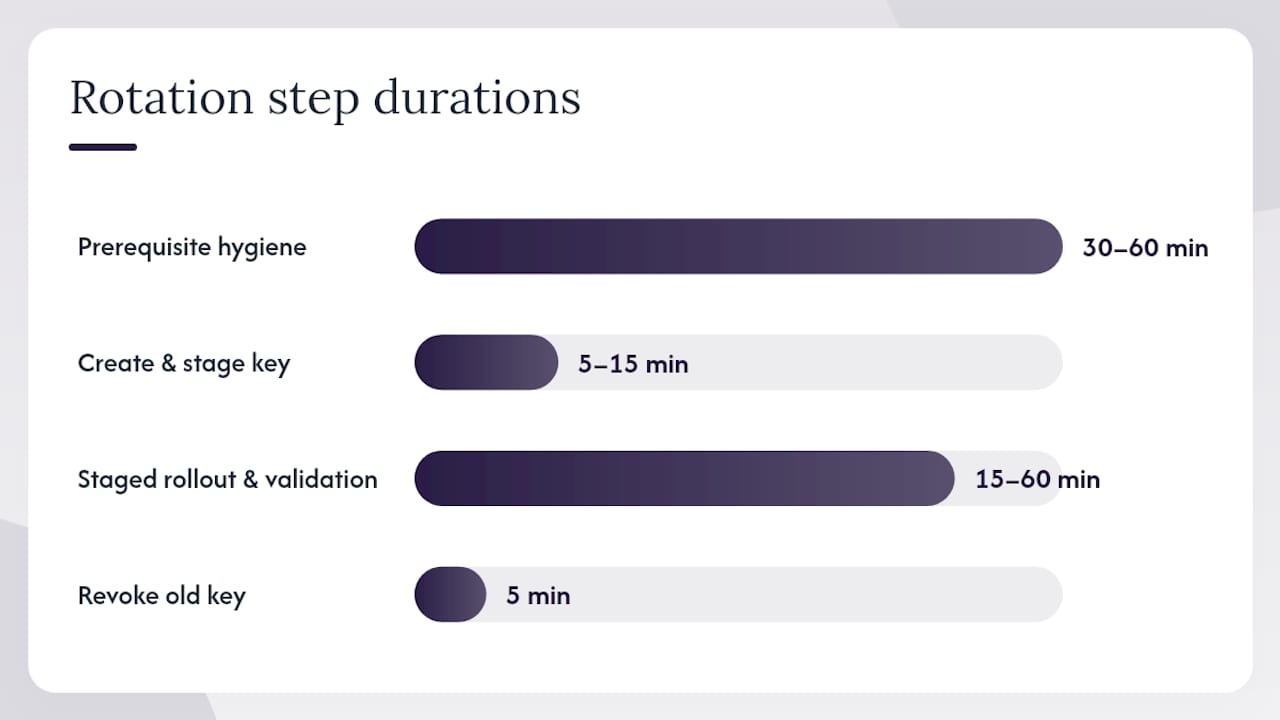
Step 1: Prerequisite hygiene (30–60 minutes)
- Audit your key inventory. Every key needs an owner, a scope, a rotation frequency, and an environment label (prod vs. test). Never use the same key across environments.
- Confirm all consumers read credentials from the secrets manager, not from environment variables baked into container images or config files.
- Verify you have a rollback plan: the previous key version is retained in the secrets manager and can be re-promoted within minutes.
Step 2: Create the new key and stage it (5–15 minutes)
- Call the provider’s key management API to generate a new key.
- Store the new key in your secrets manager (AWS Secrets Manager, HashiCorp Vault, or GCP Secret Manager) as the pending version.
- Tag the old key as “pending revocation” in your registry. Do not revoke it yet.
Step 3: Staged rollout and validation (15–60 minutes depending on service count)
- Trigger a rolling restart or config reload across consumers, starting with a canary instance.
- Run a synthetic verification call using the new key against each critical endpoint.
- Monitor error rates and latency for the full grace period (typically 15–30 minutes for internal services, longer for external integrations).
Step 4: Revoke the old key and close the loop (5 minutes)
- Only after synthetic tests pass and error rates are nominal, call the provider API to delete the old key. Paddle’s rotation documentation makes this explicit: verify usage has migrated before deletion.
- Update the registry entry to “revoked” with a timestamp.
- If validation fails at any point, re-promote the previous key version from the secrets manager and page the on-call engineer.
Pro Tip: Set a hard deadline on the grace period. An overlap window that stays open indefinitely defeats the purpose of rotation. Fifteen minutes is enough for most internal services; 24 hours is the outer limit for complex third-party integrations.
Automating rotation with Vault, AWS, GCP, and Kubernetes
The canonical automation architecture looks like this:
Rotation Orchestrator → Secrets Manager → Provider API → Consumer Reload
Each layer has a specific job. The orchestrator schedules and triggers rotation. The secrets manager stores both key versions during the overlap. The provider API creates and deletes keys. The consumer reloads credentials on a signal from the secrets manager or on its next startup.
Tool-by-tool breakdown:
- HashiCorp Vault. Vault’s dynamic secrets engine is the most powerful option. For providers that support it, Vault generates a unique credential per lease and revokes it automatically at TTL expiry. For static API keys, use Vault’s KV v2 store with versioning enabled so you can roll back to the previous version instantly. Vault Agent or the Vault Secrets Operator for Kubernetes handles consumer-side credential injection.
- AWS Secrets Manager. Supports native rotation via Lambda rotation functions. You write (or use an AWS-provided) Lambda that calls the provider API to create a new key, stores it as the pending secret version, tests it, and then promotes it to the current version. AWS handles the scheduling and retry logic. The how-to-rotate GitHub collection from Truffle Security includes provider-specific recipes you can adapt directly.
- Google Secret Manager. Does not have a built-in rotation Lambda equivalent, but supports rotation notifications via Pub/Sub. A Cloud Function subscribes to the rotation topic and executes the same create-store-verify-revoke flow. OpenRouter’s rotation documentation illustrates this pattern clearly for API-driven key management.
- Kubernetes patterns. Two common approaches: the External Secrets Operator syncs secrets from Vault or AWS Secrets Manager into Kubernetes Secrets and triggers pod restarts on version change. A sidecar container (Vault Agent) injects credentials directly into the pod filesystem and refreshes them before TTL expiry without a restart.
| Tool | Rotation trigger | Dual-key support | Consumer reload mechanism |
|---|---|---|---|
| HashiCorp Vault | Lease TTL / manual | Via KV v2 versioning | Vault Agent / Secrets Operator |
| AWS Secrets Manager | Schedule / Lambda | Via staging labels | SDK auto-refresh / pod restart |
| GCP Secret Manager | Pub/Sub notification | Via version aliases | Cloud Function / pod restart |
| Kubernetes (ESO) | Secret version change | Depends on backend | Automatic pod restart |
One operational concern worth flagging: some providers rate-limit key creation API calls. If you are rotating thousands of keys in a batch job, stagger the calls or you will hit a 429 and leave keys in a half-rotated state.
Reusable code snippets for common rotation flows
The pattern below is a minimal zero-downtime rotator in Python pseudocode. It covers the create-store-validate-revoke cycle and can be adapted to any secrets backend.
import boto3, requests, time

def rotate_key(service_name: str, provider_client, secrets_client):
    # Step 1: Generate new key at provider
    new_key = provider_client.create_api_key(service_name)

    # Step 2: Store new key as pending version
    secrets_client.put_secret_value(
        SecretId=service_name,
        SecretString=new_key,
        VersionStages=["AWSPENDING"]
    )

    # Step 3: Validate new key works
    if not validate_key(new_key):
        raise RuntimeError("New key validation failed — aborting rotation")

    # Step 4: Promote new key, demote old
    secrets_client.update_secret_version_stage(
        SecretId=service_name,
        VersionStage="AWSCURRENT",
        MoveToVersionId=get_pending_version_id(secrets_client, service_name),
        RemoveFromVersionId=get_current_version_id(secrets_client, service_name)
    )

    # Step 5: Wait for grace period, then revoke old key
    time.sleep(GRACE_PERIOD_SECONDS)
    old_key = get_previous_key(secrets_client, service_name)
    provider_client.delete_api_key(old_key)

def validate_key(key: str) -> bool:
    resp = requests.get("https://api.provider.com/health",
                        headers={"Authorization": f"Bearer {key}"})
    return resp.status_code == 200
For scheduling, a Kubernetes CronJob works well for periodic rotation:
apiVersion: batch/v1
kind: CronJob
metadata:
  name: api-key-rotator
spec:
  schedule: "0 2 * * 0"   # Weekly at 2 AM Sunday
  jobTemplate:
    spec:
      template:
        spec:
          containers:
          - name: rotator
            image: your-org/key-rotator:latest
            env:
            - name: SERVICE_NAME
              value: "payment-gateway"
          restartPolicy: OnFailure
The OneUptime rotation implementation guide shows a similar rotator class pattern with generateKey(), rotate(), validate(), and cleanup() methods that map directly to this structure.
Pro Tip: Store the previous key version in the secrets manager for at least 48 hours after revocation. If a consumer was offline during the rotation window and comes back up with a cached old key, you need time to catch and fix it before the old key disappears entirely.
How do you test and monitor rotation jobs?
Synthetic verification is the non-negotiable first step: before revoking the old key, make a real API call with the new one and confirm a 200 response. Everything else builds on that baseline.
Key metrics to instrument:
| Metric | What it signals |
|---|---|
rotation_success_total |
Cumulative successful rotations per service |
rotation_failure_total |
Failed rotations needing immediate investigation |
api_key_age_days |
Keys approaching or exceeding policy thresholds |
unauthorized_use_detected_total |
Attempted use of a revoked key (possible breach indicator) |
Alert thresholds to configure:
- Rotation failure rate above 1% across a batch job: page on-call immediately.
- Synthetic test failure for any production service: halt rotation, re-promote previous version.
api_key_age_daysexceeding the policy threshold (90 days for production, 30 days for service-to-service): trigger rotation automatically or create a ticket.- Any non-zero value on
unauthorized_use_detected_total: treat as a potential incident.
Audit log requirements for compliance:
- Who initiated the rotation (service account or human identity).
- Timestamp of each phase: key creation, staging, validation, promotion, revocation.
- Result (success, failure, rollback).
- Rollback events with reason codes.
Retain these logs for the period your compliance framework requires. SOC 2 Type II auditors typically want 12 months of rotation history. PCI-DSS requires evidence that keys are rotated at least annually, with documentation of the process.
Common pitfalls and practical best practices
The mistakes that cause production incidents during rotation are almost always the same ones.
Do:
- Maintain a central registry where every key has an owner, scope, environment label, and rotation schedule.
- Apply least-privilege scopes. A key that can only read from one endpoint cannot be used to exfiltrate data from another.
- Use short TTLs wherever the provider supports them.
- Keep test and production keys completely separate. Using the same key across environments is one of the most dangerous mistakes teams make, and it makes rotation nearly impossible to do safely.
- Integrate rotation into your onboarding and offboarding workflows so new services get registered keys and departing employees trigger immediate rotation.
Don’t:
- Store keys in plain text in environment files, config repos, or container images. Use a secrets manager.
- Commit keys to version control, even in private repos. Secret scanning tools like Truffle Security’s how-to-rotate collection exist partly because this mistake is so common.
- Revoke the old key before synthetic validation passes on the new one.
- Leave the overlap window open indefinitely.
- Skip the inventory step. You cannot rotate keys you do not know exist.
Hardening checklist:
- Enable secret scanning on all repositories (GitHub Advanced Security, GitGuardian, or equivalent).
- Add rotation schedule enforcement to your CI/CD pipeline so deployments fail if a key is past its rotation threshold.
- Run quarterly audits to identify orphaned keys from decommissioned services.
- Document your rollback procedure and test it in staging before you need it in production.
How does Jundago support rotation, governance, and compliance?
Regulated enterprises face a specific version of the rotation problem: dozens of services, multiple cloud providers, strict audit requirements, and compliance frameworks that demand evidence, not just effort. Jundago’s API lifecycle platform addresses this at the platform level rather than leaving each team to wire together their own rotation scripts.
Platform features relevant to rotation:
- Automated rotation pipelines — Jundago’s Command Center orchestrates rotation across AWS, Azure, GCP, and Oracle Cloud without requiring separate Lambda functions or Cloud Functions per provider.
The HIPAA and PCI-DSS compliance modules ship with pre-built credential lifecycle controls, so teams in healthcare and finance do not need to build rotation evidence collection from scratch.
The part most rotation guides skip
The conventional wisdom on key rotation focuses almost entirely on the mechanics: create, swap, revoke. What gets far less attention is the organizational failure mode that makes those mechanics irrelevant.
Most production rotation failures are not technical. The rotation script works fine. The secrets manager is configured correctly. The problem is that nobody knew a particular service existed, or that it was using a key that was about to be rotated. An undocumented consumer goes down, the on-call engineer scrambles to figure out what broke, and the rotation gets rolled back while the old key stays live for another quarter.
The inventory step is not a prerequisite you can skip to get to the interesting parts. It is the rotation. A team that has a complete, current registry of every key, owner, and consumer can rotate safely in minutes. A team that does not will spend hours in a post-incident review.
The second thing worth saying plainly: short-lived dynamic secrets from Vault or cloud IAM are genuinely better than any rotation schedule. A key that expires in 15 minutes does not need a rotation policy because it is already rotated by the time an attacker could use it. If your architecture allows it, moving to dynamic secrets is a better investment than perfecting your 90-day rotation automation.
Jundago handles rotation and governance for regulated teams
Regulated enterprises running APIs across multiple clouds need more than a rotation script. They need a governed, auditable process that satisfies compliance requirements without adding operational overhead to every engineering team.
Jundago delivers exactly that. The platform’s Command Center manages the full credential lifecycle across AWS, Azure, GCP, and Oracle Cloud from a single governance layer, with automated rotation pipelines that produce structured audit logs for SOC 2, PCI-DSS, and HIPAA reviews. RBAC and ABAC controls mean only authorized identities can initiate or approve rotations, and every action is timestamped and attributed.
Three capabilities that matter most for rotation at scale:
- Centralized key registry with per-key owner, scope, and rotation schedule enforced automatically.
- Multi-cloud rotation orchestration without per-provider Lambda or Cloud Function maintenance.
- Compliance-ready audit trails generated automatically, not assembled manually before each audit.
If your team is managing credential rotation across a regulated environment, request a demo at Jundago to see how the governance layer works in practice.
Further reading and authoritative sources
The sources below cover the full range of rotation implementation, from policy guidance to provider-specific recipes.
| Resource | Why it’s useful |
|---|---|
| APIScout: API Key Management Rotation & Revocation | Policy tables, rotation periods, and the dual-key overlap pattern explained in detail |
| Start with Identity: API Key Rotation Automation Guide | Orchestrator-to-vault-to-provider architecture and zero-downtime flow diagrams |
| Truffle Security: how-to-rotate on GitHub | Provider-specific rotation recipes for Stripe, GitHub, Mailchimp, and dozens more |
| OneUptime: How to Create API Key Rotation | Rotator class implementation with generate, validate, and cleanup methods in code |
| SystemsHardening: API Key Lifecycle at Scale | Registry design, telemetry recommendations, and automation patterns for large organizations |
| Google Cloud: Best Practices for Managing API Keys | Official guidance on scope limiting, periodic rotation, and avoiding key embedding |
| Paddle Developer Docs: Rotate API Keys | Provider-level example of the create-verify-delete workflow with API endpoints |
| OpenRouter: API Key Rotation | Step-by-step zero-downtime rotation with naming conventions and usage monitoring tips |